What Is Automated Packaging and How Does It Work?

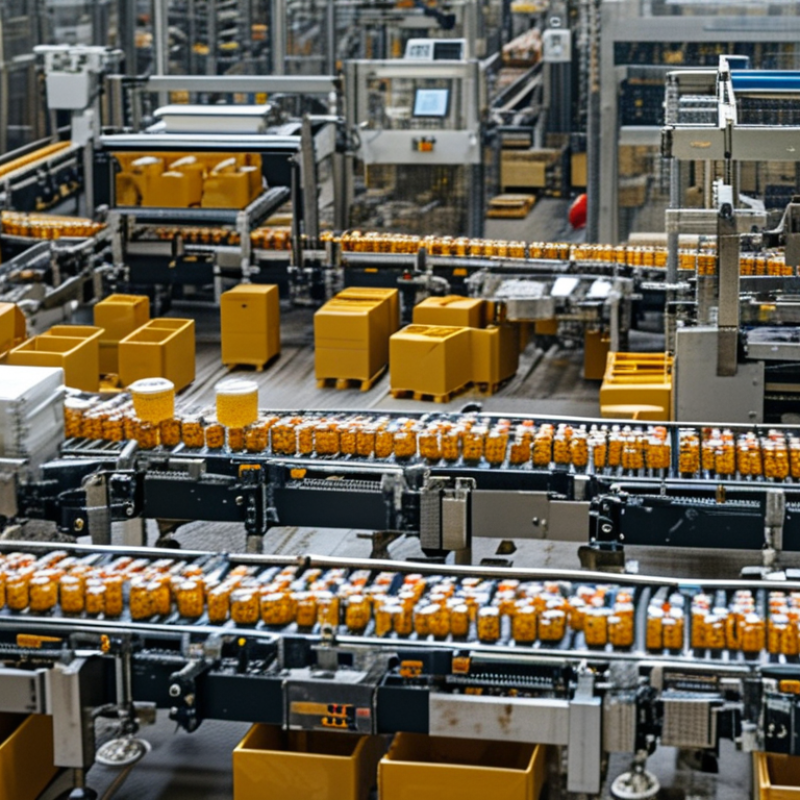
Automated Packaging combines machinery, software, sensors, and human oversight to prepare products for shipment. It can fill containers, close cartons, apply labels, and inspect finished packages. In a typical production line, products move along a conveyor while sensors detect their position and size. A programmable logic controller then coordinates fillers, sealers, printers, and robotic arms.

The process begins with product feeding and continues through measured filling, container closing, coding, inspection, and case packing. Cameras may check label placement, while checkweighers identify missing or incorrect contents. These controls help reduce repetitive labor, improve consistency, and create useful production records. However, automation is not flawless. A dirty sensor, weak seal, or poorly calibrated scale can interrupt an entire line. Human operators still matter. They inspect equipment, respond to alarms, and verify quality results.

This guide explains how Automated Packaging works in practical terms. It also examines common equipment, workflow stages, benefits, limitations, and maintenance needs. The details vary between food, beverage, pharmaceutical, cosmetic, and industrial applications. Each sector requires suitable materials, hygiene controls, traceability, and safety procedures. Reliable systems are designed around the product, package format, production speed, and applicable industry requirements. Speed alone is not enough. A faster line may create more waste when settings are wrong. Understanding that balance helps businesses choose automation more responsibly and improve performance over time.
What Is Automated Packaging and How Does It Work?

Define the System: Primary, Secondary, and Tertiary Packaging Levels

Automated packaging begins with a clear definition of three packaging levels. Primary packaging touches the product directly. It may be a pouch, bottle, tray, or sealed container. Machines fill, seal, label, and inspect these units with controlled timing. Sensors check position, weight, closure quality, and visible defects. Small errors matter here.

Secondary packaging groups primary units for handling and sale. A cartoner may place several sealed products into a printed carton. Case packers then arrange cartons into larger shipping cases. Automation can adjust spacing, count units, and verify carton contents. Operators still monitor material feeding and machine settings. A fast line is not always a reliable line.

Tertiary packaging protects grouped products during storage and transport. Palletizers stack cases in stable patterns, while stretch wrappers secure the load. Conveyors connect these stages and reduce repeated manual movement. Software records production data, detects stoppages, and supports traceability. The system works best when each level has compatible dimensions and tolerances. In practice, packaging designs are rarely perfect at the first trial. A carton may buckle, or a sensor may misread a reflective label. Engineers refine guides, speeds, and inspection limits after observing real production conditions. Safety controls and documented maintenance remain essential. Automation should support trained decisions, not replace careful judgment.

Map the Workflow: Conveying, Filling, Sealing, Labeling, and Case Packing

Automated packaging turns separate tasks into one coordinated workflow. Conveyors move empty containers at a controlled speed. Sensors check spacing, position, and product presence. If a container shifts, the system can pause or reject it. Small timing errors still cause jams, especially when packages have uneven shapes.

The filling station measures each product by weight, volume, or time. Accurate settings reduce waste and keep portions consistent. After filling, sealing equipment applies heat, pressure, adhesive, or a fitted lid. Seal sensors can detect wrinkles, gaps, or weak closures. Labeling follows, using position sensors to place information on the same area of every package. Clear codes and readable dates support traceability and inspection. Case packing then groups finished units into cartons, often with robotic or guided mechanical movements. Operators should still inspect samples because automation is not flawless.

Tips: Keep conveyors clean and properly aligned. Test fill accuracy at regular intervals. Check seal strength during production. Calibrate sensors after maintenance. Leave room for manual intervention. A perfect workflow rarely exists; product changes, dust, and temperature can expose weak points. Reviewing rejected packages often reveals problems before they become expensive.

Automated Packaging Workflow: Cycle Time by Stage

This representative operating profile shows the approximate processing time required for each stage of an automated packaging line. Conveying, filling, sealing, labeling, and case packing work together as a connected workflow, with the slowest stage influencing overall line capacity.

Measurement: representative seconds per packaged unit under steady operating conditions. Actual cycle times vary with product type, package size, machine configuration, and changeover requirements.

Explain the Control Layer: PLCs, Sensors, Vision, and IEC 61131-3

What Is Automated Packaging and How Does It Work?

The control layer is the packaging line’s decision center. A programmable logic controller, or PLC, reads inputs and sends timed commands. Sensors detect product presence, film position, temperature, pressure, and rejected packs. The PLC then coordinates conveyors, fillers, sealers, and case handlers. Timing matters. A delay of milliseconds can create a pile-up.

Timing matters. A delay of milliseconds can create a pile-up.

Vision systems add judgment where basic sensors cannot. Cameras inspect label position, seal quality, print clarity, and missing components. Their results return to the PLC through industrial communication networks. IEC 61131-3 defines common programming languages, including ladder diagram and structured text. This shared structure helps technicians test sequences, trace faults, and modify recipes more safely. Still, standardization does not remove poor logic. A badly designed interlock remains a problem.

Industry data shows why this control layer keeps developing. The International Federation of Robotics reported 541,302 industrial robot installations worldwide in 2023. Deloitte’s 2023 Smart Manufacturing Survey found that 86% of manufacturers expected smart manufacturing to support competitiveness within five years. These figures describe broad manufacturing, not packaging alone, but the pressure is clear. In practice, reliable automation depends on clean sensor signals, realistic fault handling, and disciplined commissioning. Engineers sometimes overtrust vision data. Lighting changes. Dust appears. Operators improvise. The control design must expect those imperfect conditions.

541,302 industrial robot installations worldwide in 2023
86% of manufacturers expected smart manufacturing to support competitiveness within five years

Build in Safety: ISO 12100, ISO 13849-1, and Performance Levels

Automated packaging uses conveyors, sensors, actuators, and control systems to fill, seal, label, and move products. A conveyor may continue running while an operator clears a jam, creating serious risks. Safety must be designed into the machine, not added after installation.

ISO 12100 provides the risk assessment foundation. Engineers identify hazards, estimate risk, and apply safeguards through a documented process. A guarded access door, for example, should stop hazardous movement when opened.

ISO 13849-1 then helps evaluate safety-related control systems. It considers the required Performance Level, or PLr, along with architecture, MTTFd, diagnostic coverage, and common-cause failures. A higher-risk motion may require PL d or PL e. The achieved level must be verified, not assumed from component labels.

In practice, teams can overlook restart behavior or maintenance access. That gap deserves honest review.

Tips:

Define every safety function in plain language. Test the actual stop time at the machine. Check sensors, wiring, logic, and actuators together. Keep validation records, including failed tests and corrective actions. A system can appear compliant yet behave poorly during a jam. Reassess risks after changing speed, tooling, software, or product flow. Always confirm current standard editions and local requirements with qualified safety professionals.

Measure Results: 85% OEE, Throughput, Scrap, Changeovers, and Payback

Automated packaging connects conveyors, sensors, filling equipment, sealers, vision inspection, and case packing controls. The system measures product movement continuously. It can also reject damaged seals or incorrect weights within seconds. The International Federation of Robotics reported 541,302 industrial robot installations worldwide in 2023. Packaging automation is part of this wider shift.

Measure results, not machine speed alone. OEE combines availability, performance, and quality.

An 85% OEE level is widely used as a world-class benchmark, but it should not become a decorative target.

Track throughput by hour, scrap by cause, and changeover minutes by product family. A five-minute delay may seem minor. Repeated daily, it can remove hundreds of sellable cases monthly. Automated packaging often exposes these hidden losses.

Payback should use verified production data. Divide the investment by annual savings from labor, scrap reduction, downtime recovery, and added output. Include training, maintenance, utilities, and rejected products.

A 2024 global smart-manufacturing survey found that 86% of executives viewed smart operations as important for future competitiveness. Still, the number does not prove financial success.

A line may reach 85% OEE while producing the wrong product efficiently. Data quality remains the uncomfortable weakness. Measure baseline performance for several weeks, then compare identical shifts after installation.